How We Built a Custom Shopify Product Configurator for NAYA.TECH
NAYA.TECH sells a two-time CES Innovation Award-winning modular keyboard with 16 configurations. Building the store meant encoding the product's rules into a real-time configurator that works without heavy infrastructure. Here's four years of that work.
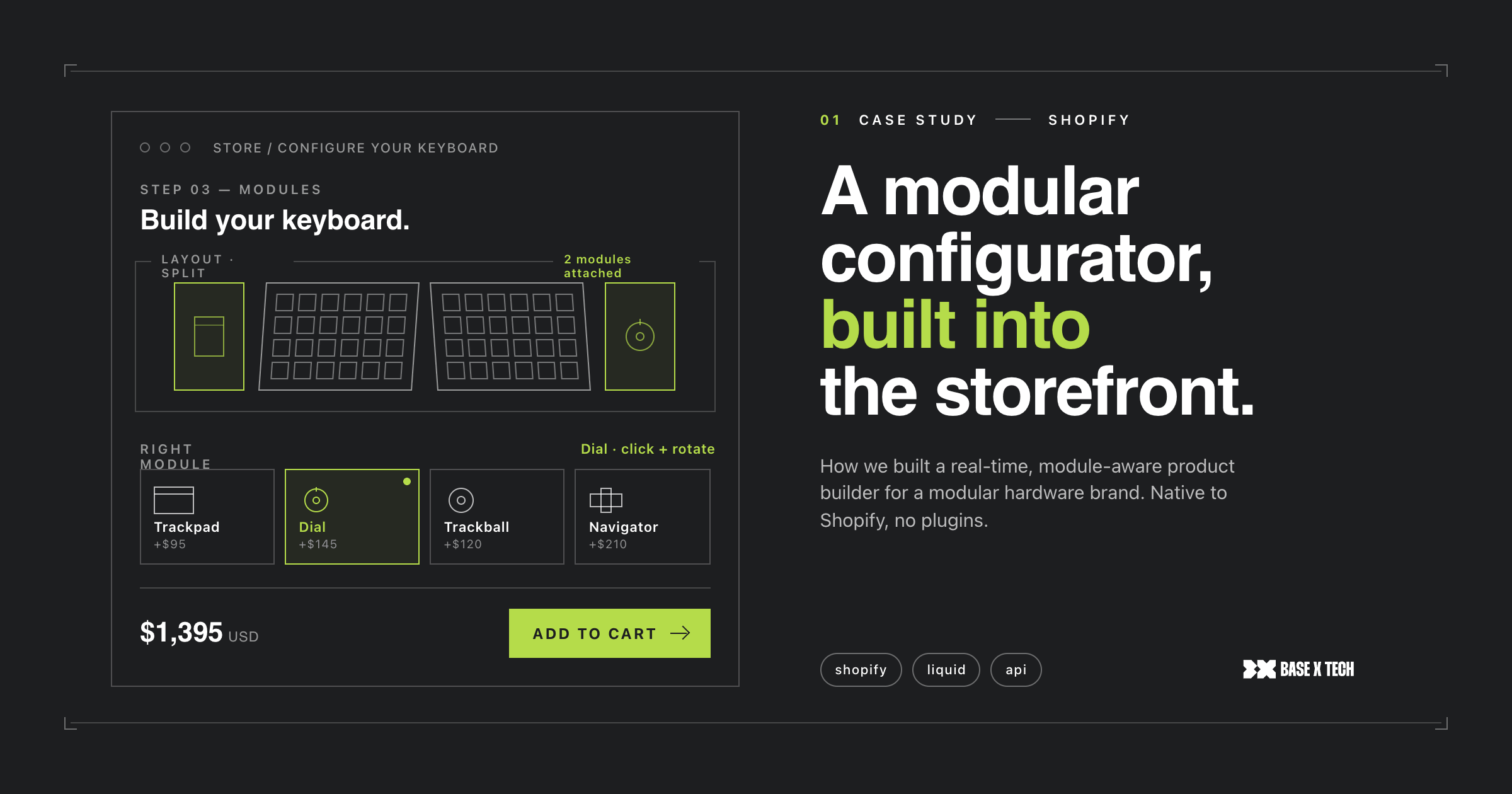
Can Shopify handle a custom product configurator with real-time compatibility rules and dynamic pricing, without going headless? Yes. We built a custom Shopify product configurator for NAYA.TECH, a two-time CES Innovation Award winner, and we've maintained it for four years as the product line expanded.
Building a Shopify store for a product this complex takes more than development skill. It requires understanding the product well enough to translate its complexity into a buying experience that actually works, and staying close enough to the business to keep up as it evolves. We've been doing that for NAYA.TECH for four years.
What NAYA.TECH builds, and why it's a hard product to sell online
NAYA.TECH is a hardware startup from Groningen, Netherlands. Their product is the Naya Create: a modular ergonomic keyboard for digital professionals, with a split design, hot-swappable input modules, and 16 possible configurations. The keyboard has earned two CES Innovation Awards: one in 2023 for Naya Create and a second in 2024 for the Naya Tune and Float modules. The company has raised millions through investment and crowdfunding, and began shipping to backers in February 2025.
The product replaces standalone input devices (mice, trackpads, 3D navigators, dials) with hot-swappable modules that sit directly between the thumb and index finger. A professional configures their setup for audio engineering, video editing, XR work, or general productivity, switching between workflows without a second device.
The challenge for the store: you can't sell this as a standard SKU. A customer builds their keyboard, choosing a body, selecting modules, picking switch types, choosing a layout. Each choice affects what comes next. Some combinations work. Some don't. Some change the price. Some change what's available to select at all.
Get that logic wrong and customers either order incompatible combinations, or they hit a wall mid-configuration and abandon. Neither is acceptable for a product with this level of pre-launch credibility.
What the store needed, and the custom Shopify configurator we built
NAYA.TECH's existing store couldn't keep up with the product's complexity or the brand's growth. They needed a custom product configurator, UX improvements, better checkout performance, and proper integrations, all while the store remained live.
At the core is a step-by-step product builder that guides customers through their configuration choices in the right order. Each selection is validated in real time: if a combination is incompatible, it's removed from the available options before the customer can choose it. When the customer finalises their build, the component assembles the selection into a multi-product order and submits it to Shopify's cart.
The configurator achieves a premium, interactive feel through carefully art-directed image sets that update as selections change, without the complexity or performance cost of real-time 3D rendering. The result loads fast, works across devices, and doesn't introduce frontend dependencies that need ongoing maintenance.
Beyond the configurator: Klaviyo for email, Judge.me for reviews, multi-currency support, and Shopify's own checkout and Shop Pay for fulfilment. All integrations are set up and maintained as part of the ongoing engagement.
Four years of work: what each phase looked like
The initial build (rebuilding the store, designing and implementing the configurator, and setting up the integration stack) took approximately three months. That's not a fixed number: configurator complexity varies significantly by product, and we've worked on similar scopes that came together in a matter of weeks. Three months was the right timeline for a product with 16 configurations, strict incompatibility rules, and a brand standard that had to match CES-award-winning hardware.
NAYA.TECH launched with a store that handled the product's complexity without overwhelming the buyer. That was year one.
Years two, three, and four looked different: new product lines, new markets, performance work as traffic scaled, iterative UX improvements as the product evolved. The ongoing engagement is structured around a shared backlog and regular cadence, which means when NAYA.TECH adds a new module or changes a configuration rule, we're already up to speed. No re-onboarding, no knowledge transfer, no explaining original decisions from scratch.
What A/B testing showed about the configurator's UX
In the second half of 2024, we ran a structured A/B testing programme across three layout and content variants to find the highest-converting approach.
Variant 01 (simplified navigation, improved images, CTAs above the fold): 12.4% conversion. Placing calls-to-action above the scroll and adding user testimonials at key decision points drove the best results.
Variant 02 (focus on technical specifications): 8.9% conversion. Technical depth without emotional cues led to average results and decreased interest.
Variant 03 (text-heavy, minimal images): 6.7% conversion. Overloading the page with text and reducing imagery hurt engagement and overall performance.
The gap between Variant 01 and Variant 03 is 5.7 percentage points, meaningful for a hardware product at this price point. We're continuing to iterate on the findings from this test, but aren't in a position to share the next round of results yet.
The headline finding holds across complex technical products: buyers need enough information to feel confident, but emotional cues (imagery, testimonials, clear hierarchy) drive conversion more than specification depth. A keyboard aimed at creative professionals needs to look like something they'd want on their desk. That's a design and content problem as much as a development one.
What we'd recommend for complex product configurators on Shopify
Most brands with technically complex products reach for a heavy front-end framework first, because it sounds like the right architecture for something sophisticated.
In my experience, it usually isn't. A heavier technical stack adds real cost and ongoing maintenance overhead, and most of the complexity it solves can be handled with well-structured logic and careful product modelling in Shopify. The question isn't what's technically possible. It's what's appropriate for the product and the team that will maintain it over time.
What matters more than the stack: whether the team building the store understands the product well enough to encode its rules correctly. A configurator that looks impressive but breaks on edge cases fails the buyer at the moment that matters most. And a codebase that nobody understands six months after launch is a liability, not an asset.
The NAYA.TECH store has absorbed four years of product evolution (two new CES-awarded module lines, new markets, and significant UX iteration) without structural changes to the configurator architecture. That's the outcome you're actually after.
Frequently asked questions
Can Shopify handle a complex product configurator without going headless?
Yes. A well-built Shopify theme with custom configuration logic handles real-time option validation, incompatibility rules, and dynamic pricing without a headless architecture. Headless adds significant cost and maintenance overhead that most configurator use cases don't require.
How long does a custom Shopify configurator build take?
It varies significantly by product complexity. For NAYA.TECH (16 configurations, real-time incompatibility rules, multi-product bundle submission) the initial build took approximately three months. Simpler configurators can come together in a few weeks. Highly complex builds with deep ERP integration or 3D rendering take longer.
What makes a product configurator on Shopify technically challenging?
The hardest part isn't showing options. It's encoding the rules between them: which combinations are valid, how one selection constrains the next, how pricing updates dynamically, and how incompatible options are hidden before the customer reaches checkout. Getting this logic right requires understanding the product in detail, not just the platform.
How do you handle incompatible product combinations in a Shopify configurator?
The logic layer sits between the UI and the cart. Each selection triggers a real-time validation check, and incompatible options are removed from the interface before the customer can choose them. Incompatibility errors should happen before checkout, not after fulfilment.
Does Shopify Standard support custom configurators, or do you need Shopify Plus?
Custom configurators work on standard Shopify plans, because the configuration logic lives in the theme, not in Shopify's admin or checkout. Shopify Plus adds checkout customisation and higher API rate limits, which matter for some integration use cases, but aren't required for a product configurator.
What happens to the store when the product line expands?
If the configuration rules are cleanly modelled and the codebase is documented, adding a new product line is a contained change. The NAYA.TECH store has absorbed four years of product evolution, including two new CES-awarded module lines, without structural changes to the configurator architecture.
Base X Tech builds custom Shopify solutions for technically complex products. If you want to scope a similar build for your store, contact us.