The Analytics Tools Your Shopify Store Needs Before Q4
Q4 is the worst possible time to discover your tracking is broken. Here's the analytics stack every Shopify store should have installed and verified before the traffic arrives — what each tool is for, why it matters, and how to set it up so your data is trustworthy when it counts.
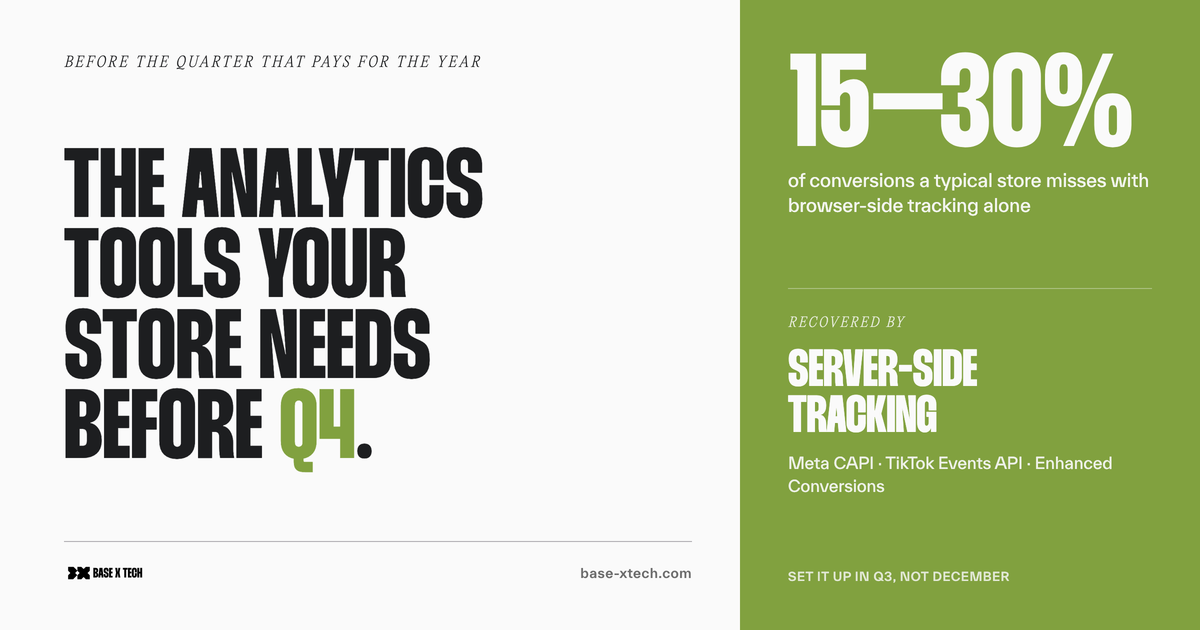
Q4 is the quarter that pays for the year. It's also the worst possible time to discover your tracking is broken — because by the time you notice that your ROAS looks mysteriously flat three weeks into Black Friday, the traffic you can't measure is already gone, and you can't get it back.
The stores that come out of Q4 with clear answers aren't the ones that scrambled to install analytics in November. They're the ones who had their measurement stack set up, verified, and collecting clean baseline data months before the traffic arrived. That's the entire point of this post: the tools you want in place before your biggest quarter, what each one is actually for, and how to set it up so the data you collect is trustworthy when it matters most.
A note before the list: this isn't "install all of these." It's a menu of the tools that matter, grouped by job. A small store might run five of them well; a larger one might need all of them. Running three of them properly beats running ten badly — half-configured tracking produces confident-looking numbers that are quietly wrong, which is worse than no numbers at all.
First, the thing that will catch stores off guard this year
Before any tool list, one urgent check, because it will silently break tracking for a lot of stores heading into Q4 2026.
Shopify has retired the "Additional Scripts" field — the box in checkout settings where merchants (and apps, and past developers) used to paste tracking codes like Google, Meta, or TikTok pixels. Per Shopify's own deprecation notices, it was sunset for Shopify Plus stores on 28 August 2025, and for non-Plus stores on 26 August 2026. Any tracking script still living in that field stops firing when the upgrade hits.
The reason this is dangerous is that nothing looks broken. Orders keep coming in. The storefront works. But the conversion tracking your ad platforms rely on can quietly go dark — and you find out weeks into your biggest quarter, when the numbers stop making sense. If you haven't already migrated your tracking to Shopify's Customer Events (web pixels) or a dedicated app, that's the first thing to check, before anything else in this post. (The replacement is Shopify's Customer Events — web pixels — or a dedicated tracking app.)
With that out of the way, here's the stack.
The measurement foundation
These are the non-negotiables. Every store should have these installed, verified, and collecting data well before Q4 — they're the base layer everything else builds on.
Shopify's native analytics
Start here, because it's already in your admin, it's free, and it's the one source that doesn't lie to you about orders. Shopify's built-in Analytics and Reports show sessions, conversion rate, average order value, top products, and traffic sources, straight from the platform that actually processes the orders.
Why it matters before Q4: every other analytics tool will undercount compared to Shopify, and you need to know that going in (more on why below). Shopify's own reports are your source of truth for what actually sold. Learn what "normal" looks like in your dashboards now, so an anomaly during Black Friday is obvious rather than ambiguous.
Google Analytics 4 (GA4)
GA4 is the free, industry-standard tool for understanding behaviour — how people move through your store, where they drop off, which channels bring buyers versus browsers. Shopify's native Google & YouTube channel now sends GA4 the full enhanced-ecommerce event set (page views, product views, add-to-cart, checkout steps, purchases), so basic setup is more straightforward than it used to be.
Why it matters before Q4: GA4 is where you'll diagnose why Q4 traffic did or didn't convert. But it needs setup time to be trustworthy — and a few specific things catch people out:
- GA4 will always show fewer orders than Shopify. Ad blockers, Safari and Firefox tracking prevention, and declined cookie consent all remove measurable sessions. Shopify's admin is the accurate order count; GA4 is the accurate picture of behaviour among measurable sessions. Treating GA4 as an order ledger leads to the wrong conclusion every time.
- Exclude your own traffic. Set up an internal traffic filter (Admin → Data Streams → configure internal traffic) so your team's browsing and test orders don't pollute Q4 data.
- Check for double-counting. If you run both Shopify's Google channel and a GTM-based GA4 setup, you can count everything twice. Confirm you don't see two
page_viewevents per page load in Realtime.
Set this up now so it has weeks of clean data before the peak — a baseline you can compare against.
Google Tag Manager (GTM)
Google Tag Manager is the control panel for your tags — a single container where you manage GA4, ad pixels, and other tracking without editing theme code for every change. It's free, and it's what keeps a growing tracking setup maintainable rather than a tangle of hard-coded scripts.
Why it matters before Q4: when you need to add or fix a tag mid-season, GTM lets you do it in one place without a developer touching the theme — and, increasingly, it's the foundation for server-side tracking (below). Getting your tags organised in GTM before Q4 means changes during the quarter are quick and low-risk.
Google Search Console (GSC)
Search Console is Google's free tool showing how your store performs in organic search — which queries you rank for, your click-through rates, indexing issues, and technical problems Google sees on your site. It's the only tool that shows you Google's own view of your store.
Why it matters before Q4: organic traffic is the highest-converting, lowest-cost channel you have, and Q4 is when the seasonal queries spike. GSC tells you which product and category pages are eligible to catch that demand — and flags indexing or crawl problems that would otherwise quietly cost you free traffic during peak. Have it verified and collecting history now, so you can spot a ranking drop the moment it happens rather than after the quarter.
The advertising layer
If you spend on paid acquisition, these platforms need accurate conversion data flowing back to them — because that's what their algorithms optimise against. Bad conversion signal in Q4 means wasted spend at exactly the moment you're spending the most.
Google Merchant Center
If you run Google Shopping or want free product listings, Merchant Center is where your product feed lives. It feeds Shopping ads and the free listings that appear in Google's Shopping tab.
Why it matters before Q4: a product feed with errors — missing GTINs, disapproved products, mismatched prices — means your products don't show, and feed problems can take days to resolve. Get your feed clean and approved well before the Q4 shopping rush, not during it. Shopify's Google & YouTube channel syncs your catalogue to Merchant Center, but the feed still needs auditing.
Meta Ads (Pixel + Conversions API)
If you advertise on Facebook or Instagram, Meta needs to know which ad drove which purchase. That's two systems working together: the Meta Pixel (browser-side) and the Conversions API / CAPI (server-side). You want both, because the browser-side pixel alone now misses a meaningful share of conversions.
Why it matters before Q4: Meta's algorithm optimises delivery based on the conversions you report back to it. Under-report conversions and you're handicapping the algorithm during your most important campaigns. The browser pixel alone loses events to ad blockers and iOS tracking restrictions — independent tooling data suggests a typical store misses somewhere around 15–30% of conversions client-side. Adding CAPI (server-side) recovers a chunk of that signal. This takes setup and testing, so it's a "do it in Q3" job, not a Black Friday one.
TikTok Ads (Pixel + Events API)
The same logic applies to TikTok, if it's part of your mix: the TikTok Pixel handles browser-side tracking and the Events API is the server-side counterpart. Together they give TikTok's algorithm the conversion signal it needs to find buyers.
Why it matters before Q4: TikTok has become a real acquisition channel for many ecommerce brands, particularly for younger audiences and impulse-driven gifting — exactly the Q4 shopper. If you're going to spend there during peak, the tracking needs to be accurate before the spend ramps up. Like Meta, TikTok's server-side API needs setting up and verifying ahead of time.
Server-side tracking (the thread connecting the ad layer)
Worth calling out on its own, because it's the single biggest measurement upgrade most stores can make. Server-side tracking sends conversion events from a server rather than the shopper's browser, which sidesteps ad blockers, browser privacy restrictions, and dropped connections. Meta's CAPI, TikTok's Events API, and Google Ads Enhanced Conversions are all server-side systems, usually orchestrated through a server-side GTM container or a dedicated Shopify app.
Why it matters before Q4: with a growing share of browser-side events lost to privacy tech, server-side is how you keep your conversion data — and therefore your ad optimisation — accurate. One caveat worth knowing: a server-side setup that breaks has no automatic fallback to the browser, so it needs to be configured properly and monitored. Set it up and stress-test it in Q3; don't flip it on the week before Black Friday.
The behaviour layer: seeing what shoppers actually do
Numbers tell you what happened. These tools show you why — the friction, confusion, and drop-off that a conversion rate alone can't explain.
A heatmap and session tool (Microsoft Clarity, Hotjar, or Plerdy)
These tools record how people actually use your store: heatmaps of where they click and scroll, session recordings of real visits, and (in some) funnel drop-off analysis. Microsoft Clarity is genuinely free and unlimited, which makes it the easy default; Hotjar and Plerdy add features (surveys, more structured funnels, conversion tooling) on paid plans.
Why it matters before Q4: your analytics will tell you the checkout is leaking conversions; a session recording shows you it's a broken discount-code field on mobile. Before a high-traffic quarter, watching real sessions is one of the fastest ways to catch the usability problems that quietly cost sales — and during Q4, it's how you diagnose a sudden drop-off fast. Install it in Q3 so you've got normal-traffic recordings to compare against.
The compliance layer that makes the rest legal (and accurate)
Consent management (a cookie-consent / CMP tool)
This isn't optional if you have any EU, UK, or California traffic. A consent management platform (CMP) shows visitors a compliant cookie banner and — crucially — passes their choice through to your tracking tools via Shopify's Customer Privacy API.
Why it matters before Q4: beyond the legal requirement, consent is now wired directly into whether your tracking works. For EU/UK traffic, Google requires Consent Mode v2 for its tags to behave correctly and for conversion modelling to function; Meta and TikTok have their own consent frameworks. A misconfigured banner doesn't just risk a fine — it silently contaminates the conversion data your Q4 ad campaigns depend on. Get the CMP installed and tested (deny consent, then confirm the tags actually respect it) well before peak.
The optional power-up: a profit and attribution dashboard
Once the foundations are solid, some stores add an all-in-one analytics or attribution platform — tools like Triple Whale, Northbeam, or similar — that pull ad spend, revenue, and margin into a single view and attempt cross-channel attribution.
Why it matters before Q4: during peak, you're making fast budget decisions across several ad platforms at once, and flipping between five dashboards is slow and error-prone. A consolidated view — ideally profit-based, not just revenue — helps you see which channels are actually making money in real time. These are paid tools and they're not essential for smaller stores, but for a business spending seriously across multiple channels in Q4, the single source of truth can pay for itself. The caveat: they're only as good as the underlying tracking, so fix the foundation first — a fancy dashboard on top of broken pixels just makes wrong numbers prettier.
The principle underneath all of it
If there's one idea to take from this, it's this: analytics tools need to be installed before the period you want to measure, not during it. A tool switched on in November has no baseline to compare against and no clean history to trust. The same tool switched on in Q3 spends the quiet weeks learning what "normal" looks like for your store — so when Black Friday hits, signal separates cleanly from noise.
The stores that read Q4 clearly did the boring work early: installed the stack, verified every tag fires, excluded internal traffic, tested consent, and confirmed the numbers reconcile with Shopify's own reports. None of it is glamorous. All of it is the difference between a Q4 you can learn from and a Q4 you can only guess about.
If you'd rather have your measurement stack audited and set up properly before the quarter that matters most — tags verified, server-side tracking configured, consent tested, the lot — get in touch. It's a much better conversation to have in Q3 than in December.
For the wider picture — CRO, SEO, inventory, and operational readiness — see our guide on preparing your Shopify store for Black Friday and Q4.
FAQ
What analytics tools does a Shopify store need before Q4?
At minimum: Shopify's native analytics (your source of truth for orders), Google Analytics 4 (behaviour), Google Search Console (organic search), and Google Tag Manager (tag management). If you run paid ads, add the relevant ad-platform tracking with server-side conversions — Meta Pixel + Conversions API, TikTok Pixel + Events API — plus Google Merchant Center for Shopping. A heatmap tool like Microsoft Clarity and a consent management platform round out the stack. The key is having them installed and verified before Q4, not during it.
Why is my Google Analytics revenue lower than Shopify's?
Because they measure different things. Shopify records every order it processes, so its admin reports are the accurate order and revenue count. GA4 only sees measurable sessions — and ad blockers, Safari and Firefox tracking prevention, and declined cookie consent all remove a share of those. GA4 is the right tool for understanding behaviour among trackable visitors, but Shopify's own reports are the source of truth for what actually sold. A gap between them is normal and expected.
Do I really need server-side tracking for Q4?
If you spend meaningfully on paid ads, it's close to essential now. A typical store loses somewhere around 15–30% of conversions from browser-side tracking alone, due to ad blockers and browser privacy restrictions. Server-side tracking (Meta CAPI, TikTok Events API, Google Ads Enhanced Conversions) recovers much of that lost signal, which directly improves how well the ad platforms optimise your Q4 campaigns. Set it up and test it in Q3 — a server-side setup that breaks has no automatic browser fallback, so it shouldn't be a last-minute job.
Is Microsoft Clarity or Hotjar better for a Shopify store?
Both show heatmaps and session recordings. Microsoft Clarity is completely free with unlimited recordings, which makes it the easiest starting point for most stores. Hotjar (and Plerdy) add extra tooling — on-site surveys, more structured funnel analysis, and conversion features — on paid plans. For pure "watch how people use my store and find the friction," Clarity is hard to beat on value; if you want integrated surveys and funnels, the paid tools earn their cost. Many stores start with Clarity and add a paid tool only if they need the extra features.
When should I set all this up?
Q3 — ideally by the end of the third quarter at the latest. Analytics tools need a baseline of normal-traffic data to be useful, and the ad-platform and server-side setups need time to be configured and verified. A tool installed during Black Friday gives you no history to compare against and no time to catch configuration errors. The whole point is to have clean, trusted data flowing before the traffic spike, so you can read your biggest quarter clearly.
Did Shopify really remove the tracking-scripts field?
Yes. Shopify retired the "Additional Scripts" field used for pasting tracking codes — for Plus stores in August 2025, and for non-Plus stores in August 2026. Any tracking script still in that field stops firing after the upgrade, and nothing visibly breaks, so it's easy to miss. If your pixels or tags were installed that way, they need migrating to Shopify's Customer Events (web pixels) or a dedicated tracking app — and that's the first thing to verify before Q4.
Base X Tech is a custom Shopify agency. We set up and audit measurement stacks so brands go into their biggest quarter with data they can trust. If you want your tracking verified before Q4, get in touch.