Nova Poshta Shopify Integration: Introducing Nova Poshta Connect
Ukrainian Shopify stores have always had to handle Nova Poshta TTNs manually — outside Shopify, one order at a time. Nova Poshta Connect closes that gap with automated TTN creation, real-time status sync, and a checkout delivery widget. Here's what we built and why.
If your Shopify store ships via Nova Poshta, you already know the gap. An order comes in. You open Shopify, copy the customer's details, switch tabs to Nova Poshta's portal, create the TTN manually, copy the tracking number back, paste it into Shopify. Five to eight minutes per order, every order, every day. Do that fifty times and you've spent a working morning on data entry.
That gap — Shopify doesn't know Nova Poshta exists — is what we built Nova Poshta Connect to close.
The manual TTN workflow, and why it breaks at scale
The Nova Poshta Shopify integration problem isn't complicated. It's just friction — the same friction, repeated on every single order.
Without an integration, the standard workflow looks like this: order arrives in Shopify, someone on your team opens a separate tab in Nova Poshta's business portal, manually enters the recipient's name, phone, address, and chosen delivery point, selects the parcel parameters, generates the TTN, copies it, goes back to Shopify, pastes it into the order. Then they do it again.
For a store processing ten orders a day, that's manageable. Annoying, but manageable. At fifty orders a day it's a part-time job. At a hundred it's a dedicated ops role doing nothing else.
The error rate goes up with volume too. Wrong branch code. Transposed phone number. Parcel weight that doesn't match what was shipped. Each of those becomes a customer service problem downstream — a parcel that can't be found, a delivery that goes to the wrong point, a customer asking where their order is while someone on your team goes back through the Nova Poshta portal to find out.
None of this is a Nova Poshta problem or a Shopify problem. It's a missing-connection problem. And it's been the same for every Ukrainian store on Shopify since the platform launched here.
How the Nova Poshta Shopify integration actually works
Nova Poshta Connect connects your Shopify store to Nova Poshta's API and keeps both systems in sync throughout the full order lifecycle — from the customer picking a delivery point at checkout to the merchant seeing "delivered" without touching Nova Poshta's portal once.
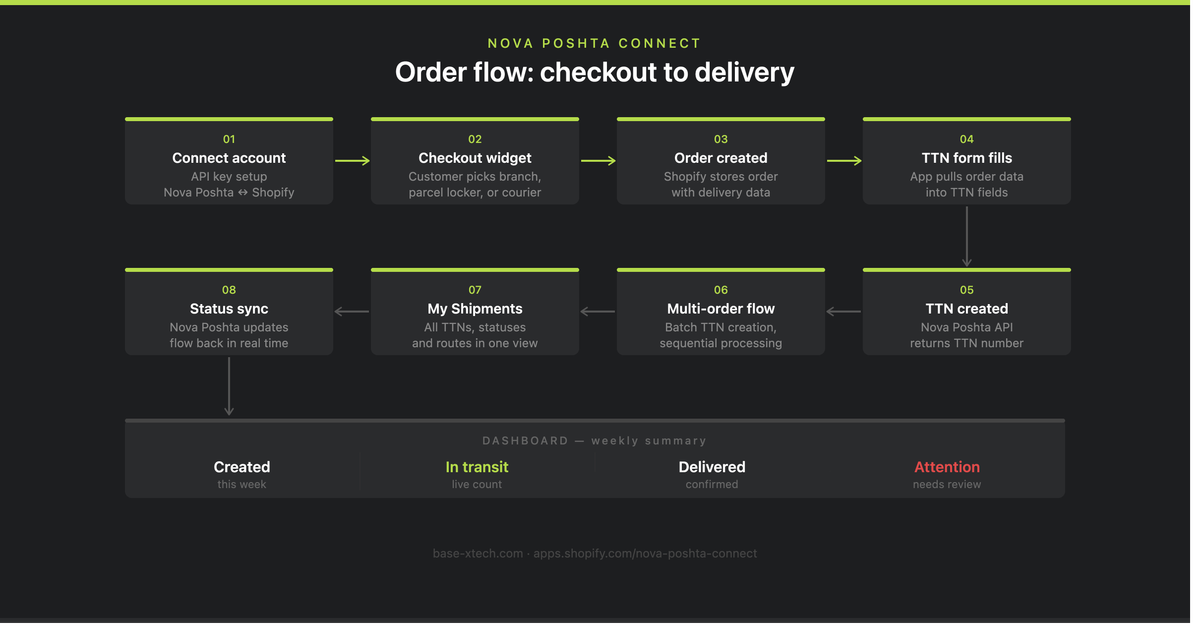
Here's the full order path.
Step 1: Connect your Nova Poshta account. After installing the app, you connect your Nova Poshta business account via API key. This gives the app access to live branch and parcel locker data, lets it create TTNs on your behalf, pulls delivery cost and parameter information, and syncs shipment statuses back. The API key is stored in your store settings.
Step 2: The customer picks their delivery point. If you're using the Nova Poshta Connect checkout widget, customers choose their delivery type — branch, parcel locker (поштомат), or courier — directly in your checkout. The widget pulls live Nova Poshta data, so customers see actual available points, not a stale static list. Their selection gets saved to the Shopify order.
Nova Poshta now operates more than 54,000 service points across Ukraine, including more than 38,000 parcel lockers (as of July 2026). If your checkout doesn't let customers choose, you're either guessing their preferred point or calling to confirm. Neither scales. The widget removes both outcomes.
If you're running a different checkout solution (such as Chekly), the app can pull delivery data from there as long as it's saved to the Shopify order in a supported format.
Step 3: Shopify creates the order. After checkout, Shopify stores the order with all the data the app needs: customer name and phone, items, payment status, the chosen delivery point, and any additional shipping attributes. At this stage the TTN doesn't exist yet — just a Shopify order with everything ready for the next step.
Step 4: Order data auto-fills the TTN form. When you open the TTN creation form in Nova Poshta Connect, the app pulls the relevant data from the order automatically — recipient name, phone, city, branch or parcel locker, courier address, delivery type, items and description, parcel parameters. You review the pre-filled form, make any changes if needed, and create the TTN. If any field can't be mapped from the order data, it stays blank for manual entry.
Step 5: TTN is created via Nova Poshta's API. When you confirm, the app validates the required fields, formats the request for Nova Poshta's API, sends sender, recipient, delivery, and parcel data, receives the response, and saves the TTN linked to the Shopify order. If Nova Poshta returns an error, the app shows a clear message so you can fix the data and retry — no lost orders, no silent failures.
Processing multiple orders at once
For stores with higher order volume, Nova Poshta Connect has a multi-order processing flow. You select several orders in Shopify, launch TTN creation through the app, and move through them sequentially — the app pre-fills each form, you review and confirm, and it automatically advances to the next order. No closing forms, no returning to the order list, no re-launching the process for each one.
Each order is handled independently: the app fetches its data, fills the form, waits for your confirmation, sends to Nova Poshta's API, saves the TTN, then moves to the next. If one order fails — wrong address, missing field — the others aren't affected. You fix the problem order and retry it separately.
After processing, the app shows a summary: which TTNs were created successfully and which need attention.
My Shipments: all your deliveries in one view
Every TTN created through the app appears in My Shipments. From there you can see order number, TTN, recipient, creation date, current status, route, cost, and any shipments flagging for attention — without opening Nova Poshta's portal.
As Nova Poshta moves the shipment through its network, the app syncs status updates back: waiting for sender handoff, accepted by Nova Poshta, in transit, arrived at branch, ready for collection, delivered, returning to sender. You see the current state next to the Shopify order without manual checking.
The dashboard aggregates all of this into a weekly summary: how many shipments created, delivered, in transit, and needing attention.
Why we built this as an app, not a custom integration
We build a lot of custom Shopify integrations for individual brands — production systems, ERPs, fulfilment logic that's specific to one operation. We've written about what that work involves.
Nova Poshta Connect is different. The problem it solves isn't unique to any one store — it's the same problem every Ukrainian Shopify merchant has. The TTN workflow, the checkout delivery selection, the status sync. Every store deals with this identically.
That's why we built it as a public Shopify app rather than repeating a custom build for each client who asked. An app means it's maintained and updated as Nova Poshta's API evolves and as Shopify's platform changes. It means you install it once and it works — you're not depending on a one-off integration that needs a developer every time something shifts.
I've been on calls with Ukrainian store owners who've been running the manual TTN workflow for two, three years. Not because they didn't want automation — because building a custom Nova Poshta integration wasn't worth the cost for a single store, and they didn't know a ready-made option existed that fit how Shopify actually works. That's the gap Nova Poshta Connect fills.
If you're building something more complex — a custom fulfilment flow, a production integration, something that requires Nova Poshta plus other systems working together — that's a different conversation, and a custom Shopify app is probably the right answer. But for the core Nova Poshta Shopify integration most Ukrainian stores need, the app covers it.
Pricing and getting started
Nova Poshta Connect starts at $7.99/month with a free trial available. Install it from the Shopify App Store, connect your Nova Poshta API key, and the integration is live. You can also view the demo store before installing.
FAQ
What is Nova Poshta Connect?
Nova Poshta Connect is a Shopify app that integrates your store with Nova Poshta's delivery service. It automates TTN creation from Shopify orders, syncs delivery statuses in real time, adds a checkout widget for customers to choose their preferred delivery point, and provides a My Shipments view for managing all deliveries without leaving the app. Built by Base X Tech, available from $7.99/month.
How does automated TTN creation work?
When an order is placed, the app pulls the customer's delivery details directly from the Shopify order and pre-fills the TTN creation form — recipient name, phone, city, delivery point, parcel parameters. You review, confirm, and the app sends the data to Nova Poshta's API. The TTN is created and linked to the Shopify order. You can also process multiple orders sequentially without re-opening the form each time.
Does Nova Poshta Connect support parcel lockers (поштомати)?
Yes. The checkout widget lets customers choose between a Nova Poshta branch, a parcel locker, or courier delivery. The selected point carries through into the TTN form automatically when it's created.
What happens when the delivery status changes?
The app syncs delivery status updates from Nova Poshta — waiting for sender, in transit, arrived at branch, ready for collection, delivered, returning to sender — back into the app's My Shipments view. No manual checking in the Nova Poshta portal needed.
Can I process multiple orders at once?
Yes. The multi-order processing flow lets you select several orders, then move through TTN creation for each one sequentially. The app pre-fills each form, you review and confirm, and it advances to the next order automatically. If one order has a problem, the others aren't affected.
How is this different from a custom Nova Poshta integration?
Nova Poshta Connect covers the standard TTN creation, status sync, checkout widget, and shipment management that most Ukrainian Shopify stores need — without custom development cost or ongoing maintenance overhead. A custom integration makes sense when you need Nova Poshta connected to other systems — an ERP, a production workflow, a fulfilment pipeline — that require purpose-built logic.
Base X Tech builds Shopify apps and custom integrations for operations that need more than an off-the-shelf solution. If Nova Poshta Connect doesn't cover your use case, contact us to scope something custom.