Shopify Multi-Store Theme: Three Stores, One Reviewed Workflow
Three Shopify stores shared one theme and kept drifting apart. Here's how we put every change, including theme editor edits, on one reviewed path to production.
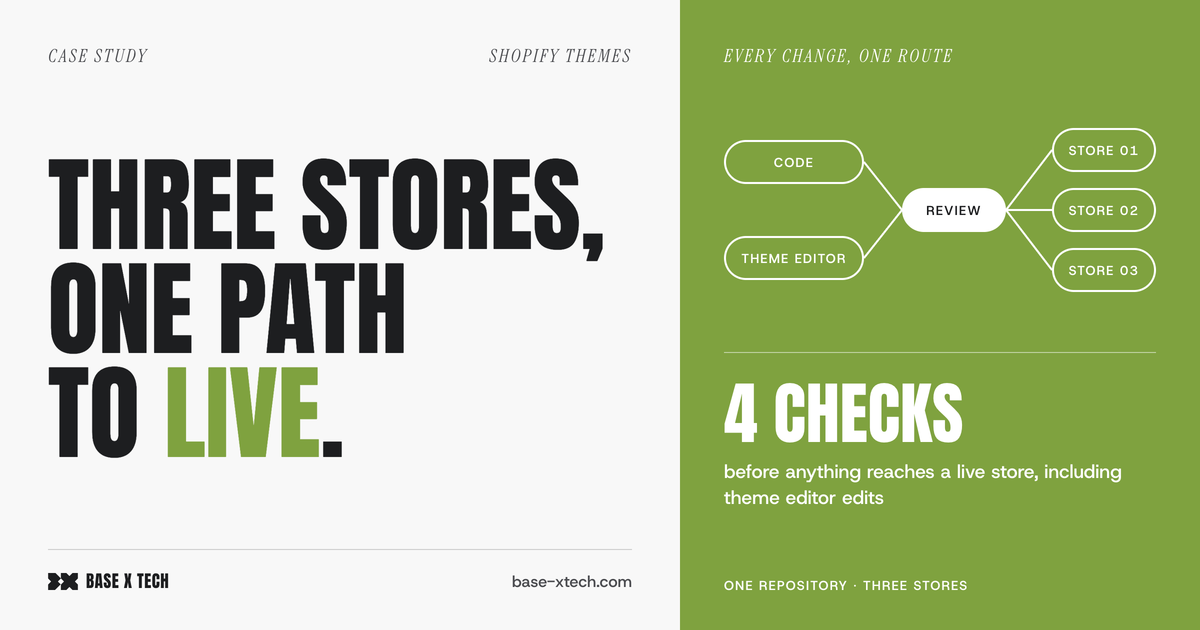
When three Shopify stores share one theme, they drift apart unless every change, including edits made in the theme editor, takes the same reviewed path to production. We set up that path for a client with three regional storefronts on a shared Shopify multi-store theme. Everything now lives in one Git repository. Each store has separate themes for staging and for editor work, every release passes automated checks, and a rollback takes one step.
This post covers the problem the client had, what we changed, and when this kind of setup is worth the effort.
The challenge: one theme, three stores, no single route to production
The client runs three stores with different domains, languages and settings, all on the same theme. Over time, four problems built up:
- The stores drifted apart. A fix made on one store had to be copied to the other two by hand, and sometimes it wasn't.
- Live edits had no history. The marketing team edited the published theme directly in the Shopify theme editor. When an edit broke something, it was hard to see what had changed and harder to undo it.
- Nothing checked a release. Code and translations reached the live stores without any automated checks.
- Credentials were scattered. Access tokens and integrations were set up in several different places.
The theme editor problem is easy to underestimate. Shopify stores theme editor customisations in settings files that are part of the theme code. That means every edit saved in the editor is a code change to the live theme. It goes live without a review, and the development side has no record of it.
Each of these problems was small on its own. Together, they meant nobody could say with confidence what was live on each store, or why.
The client also set two requirements. The marketing team had to keep using the theme editor, so banning it wasn't an option. And the client's own reviewers wanted to approve everything before it reached a live store.
What we changed
Every change takes the same path to the live store
We moved the Shopify multi-store theme into a single Git repository and connected it to the stores through Shopify's GitHub integration for themes. Each store got three themes: the published one, a staging theme, and a separate theme for editor work.
The editor theme is what kept marketing on board. The team still works in the Shopify theme editor as before, and Shopify saves each change as a commit. Nothing is lost from the editor, and every edit now has a history. To reach a live store, a change, whether it came from code or from the editor, has to go through a pull request that a reviewer approves.
To roll back, you revert the change. Shopify then restores the published theme in about a minute.
We hit one gap along the way. The GitHub integration doesn't warn about conflicts, so editor work and code work could overwrite each other without anyone noticing. To close that gap, after every release the editor theme is brought back in line with production automatically. When there's something to reconcile, a person is asked to review it first.
Two review rules sound strict but save time later. An approval is reset when new changes are pushed, and every review comment has to be resolved before a merge. That way, what goes live is exactly what was approved.
Automated checks before every release
Four checks have to pass before anything merges:
- Theme Check, Shopify's own linter for Liquid and theme JSON
- Linting for the theme's JavaScript and CSS
- A translation check that catches missing keys before they show up as raw text on a multi-language store
- Smoke tests that run against a temporary copy of the theme on the real store. The copy is deleted once the tests finish.
Security scanning runs alongside these checks as advisory. Findings appear as comments on the exact lines that changed, so reviewers don't have to dig through logs. The point is simple: problems show up in a review comment instead of on a live store.
Two decisions made the checks workable on a theme that already existed. First, some of Theme Check's rules clashed with the older code. We downgraded those rules to suggestions instead of switching them off, so the technical debt stays visible without blocking every release. Second, the smoke tests only run when a change touches the theme or the tests themselves. A change to documentation doesn't wait for a full test run.
Shared rules in one place
Workflows, linting rules and review templates are kept in one location. Changes to them reach each store through their own reviewed pull request. If someone edits these shared files on a single store's branch, the edit is rejected, so the three stores can't drift apart again. A pull request also can't change the check that evaluates it, which closes the most obvious way around the rules.
A fourth store would follow the same template.
Credentials out of the code
The repository contains no credentials. They're kept in a secrets manager, and each store's automation can only access that store's credentials. Developers working locally get credentials the same way, so they're never saved in files on laptops. Credentials that expire trigger reminders well before they lapse.
Visibility for the whole team
Editor changes reach the team as a short, summarised digest in their chat tool, so developers know what marketing changed without checking it themselves. Saves are grouped into one message per short time window instead of one message per save, so the channel stays readable. Every release to a live store is announced the same way.
Ready for AI coding agents
The developers on this project use AI coding agents. The repository gives the agents the same rules it gives people, and the risky actions are blocked by the repository itself, so the limits don't depend on what a prompt says. Those risky actions include pushing straight to production and touching credentials. Changes to sensitive areas such as the cart and checkout also get a review from a second agent before a person looks at them.
An AI agent in a theme repository is only as safe as the protection around the branches it can reach. That's why we set up the protection before bringing the agents in. For the problems AI-generated theme code can hide, see AI-generated Shopify theme blocks: the problems that look finished.
The result
- Three stores run on one shared codebase. A fix is made once and reaches all three through review.
- Every change has an author, a review and a way back, including edits made in the theme editor.
- The marketing team kept the theme editor.
- Four automated checks run before every release.
- The repository holds no credentials.
- A new store can be added with the same template.
When this is worth it, and when it isn't
We wouldn't recommend this setup for every Shopify store.
Skip it if you run one store, one developer works on the theme, and nobody else edits the live theme. For that case, Shopify's GitHub integration plus Theme Check gives you most of the value for a fraction of the setup work.
It pays off when at least one of these applies:
- Two or more stores share a theme, and every fix has to reach all of them.
- People who aren't developers edit the theme, and you need to see who changed what and undo it.
- Several developers or agencies work on the same theme.
- You're bringing AI coding agents into the theme and want the limits enforced, not just written down.
Most of the work is in decisions, not tooling. You have to decide who can release where, which checks block a release, and how editor work and code work meet. The tooling is the easy part once those decisions are made.
FAQ
Can marketers still use the Shopify theme editor with a Git-based workflow?
Yes. They work in a separate, unpublished theme. Shopify saves their edits as commits, and those edits reach the live store after a review.
Can several Shopify stores share one theme?
Yes. Each store keeps its own themes and settings, while the shared code and rules are maintained in one place. That keeps a Shopify multi-store theme consistent without anyone copying fixes by hand.
How do you roll back a bad theme release?
You revert the change in the repository. Shopify's GitHub integration then updates the published theme, usually in about a minute.
Do automated checks slow theme releases down?
They add a step to each release, but it's kept small. Findings appear on the changed lines during review, and the smoke tests are skipped when a change doesn't touch the theme.
Is it safe to let AI coding agents work on a Shopify theme?
Only if the repository enforces the limits itself: no direct releases to production, no access to credentials, and a review on every change. Instructions in a prompt aren't enough on their own.
Base X Tech builds custom Shopify solutions and AI-powered operational tooling. If you want to scope a similar setup for your stores, contact us.